Something I've wanted to do for a while is to update the base components used in many parts of the shell but have been putting off because it will take a long time to do.
Currently updated components
StateLayer
CustomSlider
Anim
Time input
Split button
Settings navrail
ScrollBar
MaterialIcon
CircularIndicator
CircularProgress
SparkLineItem
ButtonRow
ColorArcPicker
Elevation
Menu
Time input components
Integer input only, hour clamps number between 0-23 and minute clamps to 0-59
Enter to confirm input + unfocus
Escape to cancel input and revert to original value
Tab to focus next input box
Shift + Tab to focus previous input box
Settings StackView
Settings pages now have a dedicated animation when replacing each other in the StackView
Desktop icons
Desktop icons are now more efficient on initial load, closes#120
ScrollBar bug fixes and quality-of-life improvements
Fixed an issue where moving the scrollbar using the mouse in the launcher would set the flickable's contentY property to the wrong value due to not accounting for reversed lists (ListView.BottomToTop).
Scrollbars now do not snap to the cursor if you click on the handle directly, but will snap when you click outside the handle on the track.
During a flickable overshoot/rebound the y-calculation will no longer freeze due to binding directly to contentHeight of the flickable.
The hitbox for expanding their width to make it easier to pick up is now static, while visually it will be slimmer when not hovered/pressed.
UPower (Battery) popout
Updated layout
Increased panel radius to fit better with new panel layout/design
Bar popouts optional property for PanelBg (BlobRect)
Added a check for an optional property in all bar popout panel items panelRadius so individual popouts can set its radius directly in the panel itself:
Sparkline graph uses bezier curves for a more rounded look.
Drawing
On-screen drawing has been rewritten into a C++ plugin for better performance, and DrawingInput.qml has been removed in favor of using PointHandler inside Interactions.qml instead.
Uses Catmull-Rom to cubic bezier for curve smoothing.
Cursor crosshair and pen width outline preview replaces normal mouse cursor.
Added close and clear buttons to the popout.
Added pin button to popout.
Changed preset color picker to use newer ButtonBase components and ButtonRow.
ColorArcPicker has a centered rectangle for previewing current color.
Something I've wanted to do for a while is to update the base components used in many parts of the shell but have been putting off because it will take a long time to do.
## Currently updated components
- [x] StateLayer
- [x] CustomSlider
- [x] Anim
- [x] Time input
- [x] Split button
- [x] Settings navrail
- [x] ScrollBar
- [x] MaterialIcon
- [x] CircularIndicator
- [x] CircularProgress
- [x] SparkLineItem
- [x] ButtonRow
- [x] ColorArcPicker
- [x] Elevation
- [x] Menu
## Time input components
- Integer input only, hour clamps number between 0-23 and minute clamps to 0-59
- Enter to confirm input + unfocus
- Escape to cancel input and revert to original value
- Tab to focus next input box
- Shift + Tab to focus previous input box
## Settings StackView
Settings pages now have a dedicated animation when replacing each other in the `StackView`
## Desktop icons
Desktop icons are now more efficient on initial load, closes #120
## ScrollBar bug fixes and quality-of-life improvements
- Fixed an issue where moving the scrollbar using the mouse in the launcher would set the flickable's `contentY` property to the wrong value due to not accounting for reversed lists (`ListView.BottomToTop`).
- Scrollbars now do not snap to the cursor if you click on the handle directly, but will snap when you click outside the handle on the track.
- During a flickable overshoot/rebound the y-calculation will no longer freeze due to binding directly to contentHeight of the flickable.
- The hitbox for expanding their width to make it easier to pick up is now static, while visually it will be slimmer when not hovered/pressed.
## UPower (Battery) popout
- Updated layout
- Increased panel radius to fit better with new panel layout/design
## Bar popouts optional property for PanelBg (BlobRect)
Added a check for an optional property in all bar popout panel items `panelRadius` so individual popouts can set its radius directly in the panel itself:
https://git.zach-dev.cc/zach/z-bar-qt/src/commit/eb99237a31612be90436e37abe56d5a8380e8be9/Drawers/Windows.qml#L257
Example use:
https://git.zach-dev.cc/zach/z-bar-qt/src/commit/eb99237a31612be90436e37abe56d5a8380e8be9/Modules/SysTray/Popouts/UPowerPopout.qml#L9-L12
## Resources popout refresh
- Uses new components and slightly changed design.
- Sparkline graph uses bezier curves for a more rounded look.
## Drawing
On-screen drawing has been rewritten into a C++ plugin for better performance, and `DrawingInput.qml` has been removed in favor of using `PointHandler` inside `Interactions.qml` instead.
- Uses Catmull-Rom to cubic bezier for curve smoothing.
- Cursor crosshair and pen width outline preview replaces normal mouse cursor.
- Added close and clear buttons to the popout.
- Added pin button to popout.
- Changed preset color picker to use newer ButtonBase components and ButtonRow.
- ColorArcPicker has a centered rectangle for previewing current color.
zach
self-assigned this 2026-06-06 00:54:01 +02:00
Think everything looks good.
Slider handler is in the right position now.
Slider functionality has been alter a bit but I think this works / is better than what it was before.
Think everything looks good.
Slider handler is in the right position now.
Slider functionality has been alter a bit but I think this works / is better than what it was before.
Issa pretty big... Part of the settings is being cut off as well as is visible on the attached image.
Further looking good.
Everything works as intended and the audio/mic systray mod looks slick.
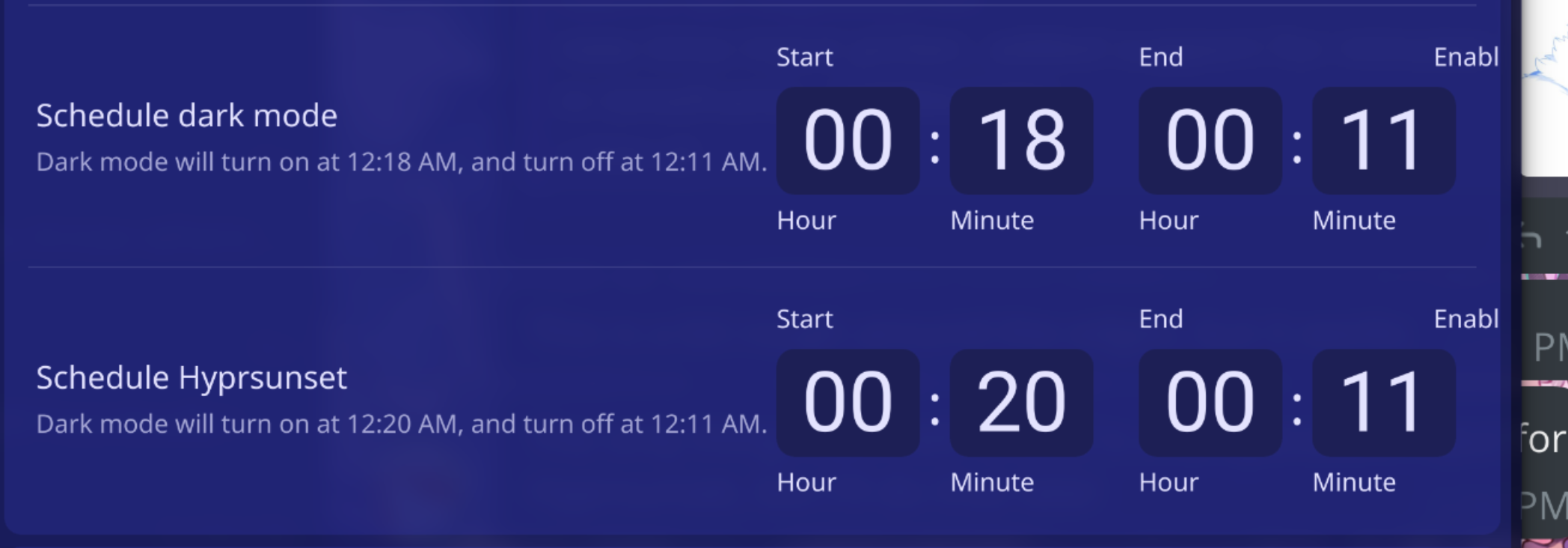
Issa pretty big... Part of the settings is being cut off as well as is visible on the attached image.
Further looking good.
Everything works as intended and the audio/mic systray mod looks slick.
Is there a goal in mind before this PR is "ready for review"?
Yeah, I wrote it in OP. There's no point in having you both review this PR when I am far from done.
> Is there a goal in mind before this PR is "ready for review"?
Yeah, I wrote it in OP. There's no point in having you both review this PR when I am far from done.
For AMD, temperature does not show properly. See image for reference. Would have to check how it shows for Intel. Have not looked at your implementation yet.
For AMD, temperature does not show properly. See image for reference. Would have to check how it shows for Intel. Have not looked at your implementation yet.
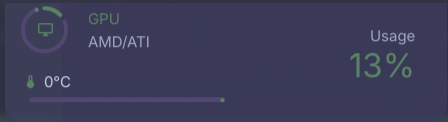
For AMD, temperature does not show properly. See image for reference. Would have to check how it shows for Intel. Have not looked at your implementation yet.
> For AMD, temperature does not show properly. See image for reference. Would have to check how it shows for Intel. Have not looked at your implementation yet.
> 
[2cb4d9b739](https://git.zach-dev.cc/zach/z-bar-qt/commit/2cb4d9b739c33571acf4b27665b4e4465ef87f79) should fix it
As for Intel; that should work for most Intel cards. Since mine is new (panther lake CPU), the kernel module for my generation of iGPU is not in the kernel yet. So that will just not work at this moment unless we implement some roundabout ourselves, which I'd suggest against doing.
Would have to check on my PC, will report back.
As for Intel; that should work for most Intel cards. Since mine is new (panther lake CPU), the kernel module for my generation of iGPU is not in the kernel yet. So that will just not work at this moment unless we implement some roundabout ourselves, which I'd suggest against doing.
Maybe its me, but with certain wallpapers or backgrounds, the cursor can be hard to spot. Perhaps having this as a config option is nice. It is great to see right away how thick the strokes will be without needing to draw them.
I also tested touchscreen drawing. It was good overall, noticed nothing odd. Only minor inconvenience is that I cannot undo without a mouse? Would be nice to have a button for it for touch users (for example when the display is flipped and mouse is inaccesible). Later on, a gesture could reveal and hide the drawing tool to be able to not use the keyboard/mouse at all.
Maybe its me, but with certain wallpapers or backgrounds, the cursor can be hard to spot. Perhaps having this as a config option is nice. It is great to see right away how thick the strokes will be without needing to draw them.
I also tested touchscreen drawing. It was good overall, noticed nothing odd. Only minor inconvenience is that I cannot undo without a mouse? Would be nice to have a button for it for touch users (for example when the display is flipped and mouse is inaccesible). Later on, a gesture could reveal and hide the drawing tool to be able to not use the keyboard/mouse at all.
Maybe its me, but with certain wallpapers or backgrounds, the cursor can be hard to spot. Perhaps having this as a config option is nice. It is great to see right away how thick the strokes will be without needing to draw them.
I also tested touchscreen drawing. It was good overall, noticed nothing odd. Only minor inconvenience is that I cannot undo without a mouse? Would be nice to have a button for it for touch users (for example when the display is flipped and mouse is inaccesible). Later on, a gesture could reveal and hide the drawing tool to be able to not use the keyboard/mouse at all.
e55d4aa36b added buttons to clear strokes and exit drawing mode. It also changes the mouse cursor to a cross while not actively drawing, and then hides again once a stroke is started. Maybe that'll make it easier to see. I also added a pin button to prevent the popout from closing, not sure how useful that is though.
> Maybe its me, but with certain wallpapers or backgrounds, the cursor can be hard to spot. Perhaps having this as a config option is nice. It is great to see right away how thick the strokes will be without needing to draw them.
>
> I also tested touchscreen drawing. It was good overall, noticed nothing odd. Only minor inconvenience is that I cannot undo without a mouse? Would be nice to have a button for it for touch users (for example when the display is flipped and mouse is inaccesible). Later on, a gesture could reveal and hide the drawing tool to be able to not use the keyboard/mouse at all.
[e55d4aa36b](https://git.zach-dev.cc/zach/z-bar-qt/commit/e55d4aa36bc035271a33e4654b25f9f8b3a48ed7) added buttons to clear strokes and exit drawing mode. It also changes the mouse cursor to a cross while not actively drawing, and then hides again once a stroke is started. Maybe that'll make it easier to see. I also added a pin button to prevent the popout from closing, not sure how useful that is though.
My pen has additional buttons, which I should have read up on what they do (maybe some features can be implemented using those buttons).
I will inform based on my findings + testing.
Will try the changes.
My pen has additional buttons, which I should have read up on what they do (maybe some features can be implemented using those buttons).
I will inform based on my findings + testing.
> My pen has additional buttons, which I should have read up on what they do (maybe some features can be implemented using those buttons).
@Inorishio should do the same with his pen.
It works perfectly fine for me.
I can set my pencil to do whatever I want so I can just tell it to right click whenever I press any button.
Though. There are specific artist buttons for pencils like mine but I reconfigured mine when I'm not drawing.
Wev is not giving me any feedback when pressing the eraser button though so I'd have to search up what button it is that gets used or function that gets called.
Further I like the change for the cross but I think the circular color should not be active whilst you are not drawing and should stay hidden as your cross until you start.
Either that or have a dotted outline of the size that will be drawn before you start drawing and or even whilst you are drawing.
^ This comes closer to how other programs do it when you draw for example gimp.
I get that you might not want to be making this because the simple drawing tool that we were making is becoming way more complex now but we are already changing our cursor to a more drawing look a like program cursor + some other settings so I did wanna mention it anyway.
Let me know what you think
It works perfectly fine for me.
I can set my pencil to do whatever I want so I can just tell it to right click whenever I press any button.
Though. There are specific artist buttons for pencils like mine but I reconfigured mine when I'm not drawing.
Wev is not giving me any feedback when pressing the eraser button though so I'd have to search up what button it is that gets used or function that gets called.
Further I like the change for the cross but I think the circular color should not be active whilst you are not drawing and should stay hidden as your cross until you start.
Either that or have a dotted outline of the size that will be drawn before you start drawing and or even whilst you are drawing.
^ This comes closer to how other programs do it when you draw for example gimp.
I get that you might not want to be making this because the simple drawing tool that we were making is becoming way more complex now but we are already changing our cursor to a more drawing look a like program cursor + some other settings so I did wanna mention it anyway.
Let me know what you think
Further I like the change for the cross but I think the circular color should not be active whilst you are not drawing and should stay hidden as your cross until you start.
The idea to have the color dot as your cursor is to immediately see the size of your stroke. Previously, you'd have to select and stroke & repeat to find the right thickness.
Though, I do not know the right approach here.
>Further I like the change for the cross but I think the circular color should not be active whilst you are not drawing and should stay hidden as your cross until you start.
The idea to have the color dot as your cursor is to immediately see the size of your stroke. Previously, you'd have to select and stroke & repeat to find the right thickness.
Though, I do not know the right approach here.
Further I like the change for the cross but I think the circular color should not be active whilst you are not drawing and should stay hidden as your cross until you start.
Either that or have a dotted outline of the size that will be drawn before you start drawing and or even whilst you are drawing.
This is a good idea, I just don't know how to do it yet but I'm sure I could do it. There's many helper classes for drawing a circle so I'll have a look at some point.
I get that you might not want to be making this because the simple drawing tool that we were making is becoming way more complex now
Yeah don't worry about that, I already went way past what I should've when I decided to not only rewrite it in C++ but also make it so each individual stroke is cached to its own FBO (Framebuffer object) on the GPU for better performance lol.
Edit: quote
> Further I like the change for the cross but I think the circular color should not be active whilst you are not drawing and should stay hidden as your cross until you start.
> Either that or have a dotted outline of the size that will be drawn before you start drawing and or even whilst you are drawing.
This is a good idea, I just don't know how to do it yet but I'm sure I could do it. There's many helper classes for drawing a circle so I'll have a look at some point.
> I get that you might not want to be making this because the simple drawing tool that we were making is becoming way more complex now
Yeah don't worry about that, I already went way past what I should've when I decided to not only rewrite it in C++ but also make it so each individual stroke is cached to its own FBO (Framebuffer object) on the GPU for better performance lol.
Edit: quote
In the image, the settingswindow separator is hard to distinguish. I do not see this as an issue, but the spaces could look odd when not noticed.
The preset scheme is catppuccin mocha green.
Other than that, approved.
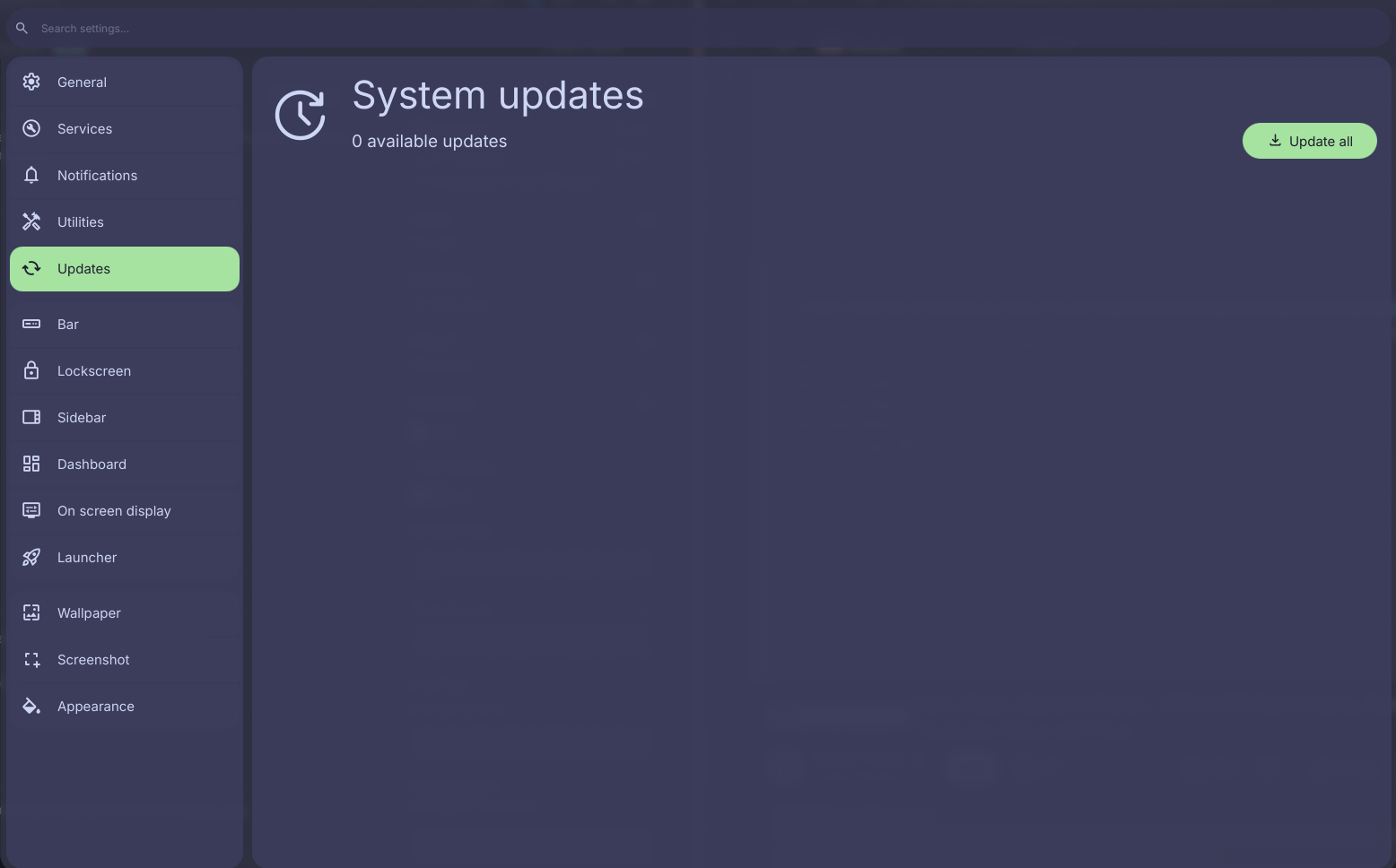
In the image, the settingswindow separator is hard to distinguish. I do not see this as an issue, but the spaces could look odd when not noticed.
The preset scheme is catppuccin mocha green.
Other than that, approved.
Blocking a user prevents them from interacting with repositories, such as opening or commenting on pull requests or issues. Learn more about blocking a user.
 Inorishio
 AramJonghu
Something I've wanted to do for a while is to update the base components used in many parts of the shell but have been putting off because it will take a long time to do.
Currently updated components
Time input components
Settings StackView
Settings pages now have a dedicated animation when replacing each other in the
StackViewDesktop icons
Desktop icons are now more efficient on initial load, closes #120
ScrollBar bug fixes and quality-of-life improvements
contentYproperty to the wrong value due to not accounting for reversed lists (ListView.BottomToTop).UPower (Battery) popout
Bar popouts optional property for PanelBg (BlobRect)
Added a check for an optional property in all bar popout panel items
panelRadiusso individual popouts can set its radius directly in the panel itself:Example use:
Resources popout refresh
Drawing
On-screen drawing has been rewritten into a C++ plugin for better performance, and
DrawingInput.qmlhas been removed in favor of usingPointHandlerinsideInteractions.qmlinstead.Think everything looks good.
Slider handler is in the right position now.
Slider functionality has been alter a bit but I think this works / is better than what it was before.
@@ -126,2 +125,3 @@Layout.fillHeight: trueLayout.bottomMargin: Appearance.padding.normalLayout.fillWidth: trueLayout.preferredHeight: Appearance.padding.larger * 3Personally like:
Layout.preferredHeight: Appearance.padding.larger * 2
Issa pretty big... Part of the settings is being cut off as well as is visible on the attached image.
Further looking good.
Everything works as intended and the audio/mic systray mod looks slick.
Is there a goal in mind before this PR is "ready for review"?
Yeah, I wrote it in OP. There's no point in having you both review this PR when I am far from done.
I do not really read a todo or expectation for when this was considered ready or satisfactory, only what is implemented currently.
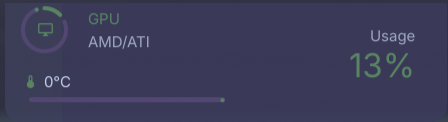
For AMD, temperature does not show properly. See image for reference. Would have to check how it shows for Intel. Have not looked at your implementation yet.
2cb4d9b739 should fix it
Would have to check on my PC, will report back.
As for Intel; that should work for most Intel cards. Since mine is new (panther lake CPU), the kernel module for my generation of iGPU is not in the kernel yet. So that will just not work at this moment unless we implement some roundabout ourselves, which I'd suggest against doing.
Can confirm; AMD temps show correctly.
Maybe its me, but with certain wallpapers or backgrounds, the cursor can be hard to spot. Perhaps having this as a config option is nice. It is great to see right away how thick the strokes will be without needing to draw them.
I also tested touchscreen drawing. It was good overall, noticed nothing odd. Only minor inconvenience is that I cannot undo without a mouse? Would be nice to have a button for it for touch users (for example when the display is flipped and mouse is inaccesible). Later on, a gesture could reveal and hide the drawing tool to be able to not use the keyboard/mouse at all.
e55d4aa36b added buttons to clear strokes and exit drawing mode. It also changes the mouse cursor to a cross while not actively drawing, and then hides again once a stroke is started. Maybe that'll make it easier to see. I also added a pin button to prevent the popout from closing, not sure how useful that is though.
Will try the changes.
My pen has additional buttons, which I should have read up on what they do (maybe some features can be implemented using those buttons).
I will inform based on my findings + testing.
@Inorishio should do the same with his pen.
It works perfectly fine for me.
I can set my pencil to do whatever I want so I can just tell it to right click whenever I press any button.
Though. There are specific artist buttons for pencils like mine but I reconfigured mine when I'm not drawing.
Wev is not giving me any feedback when pressing the eraser button though so I'd have to search up what button it is that gets used or function that gets called.
Further I like the change for the cross but I think the circular color should not be active whilst you are not drawing and should stay hidden as your cross until you start.
Either that or have a dotted outline of the size that will be drawn before you start drawing and or even whilst you are drawing.
^ This comes closer to how other programs do it when you draw for example gimp.
I get that you might not want to be making this because the simple drawing tool that we were making is becoming way more complex now but we are already changing our cursor to a more drawing look a like program cursor + some other settings so I did wanna mention it anyway.
Let me know what you think
The idea to have the color dot as your cursor is to immediately see the size of your stroke. Previously, you'd have to select and stroke & repeat to find the right thickness.
Though, I do not know the right approach here.
This is a good idea, I just don't know how to do it yet but I'm sure I could do it. There's many helper classes for drawing a circle so I'll have a look at some point.
Yeah don't worry about that, I already went way past what I should've when I decided to not only rewrite it in C++ but also make it so each individual stroke is cached to its own FBO (Framebuffer object) on the GPU for better performance lol.
Edit: quote
Changes to drawing tool look good, well done.
In the image, the settingswindow separator is hard to distinguish. I do not see this as an issue, but the spaces could look odd when not noticed.
The preset scheme is catppuccin mocha green.
Other than that, approved.